
Free Roblox Shirt Template Designs
Browse hundreds of ready-to-upload Roblox shirt designs, or generate your own with AI. Pick any shirt template, remix it, or create something new — no drawing skills required.
Popular Roblox Shirt Designs
Every Roblox shirt template design below is free to download. Find your style and upload directly to Roblox.


Test your template before uploading
Drop your finished 585×559 PNG into our free Roblox shirt tester and see it on a 3D R15 avatar in seconds — catch seam and color issues before spending Robux on an upload.
How to Get Custom Roblox Shirts
Browse or Generate
Explore our gallery of free Roblox shirt designs, or type a text description and let AI generate a unique shirt template for you.
Customize Your Pick
Use any shirt design as-is, or remix it with AI to adjust colors, patterns, and details until it matches your style.
Upload to Roblox
Download the finished 585×559 PNG and upload at roblox.com/create. Your custom Roblox shirt goes live in minutes.
Prefer to Design from Scratch?
For experienced designers who want full creative control, download the official blank template files.
Want 3D layered clothing instead of a 2D template? Try our Roblox clothing maker.
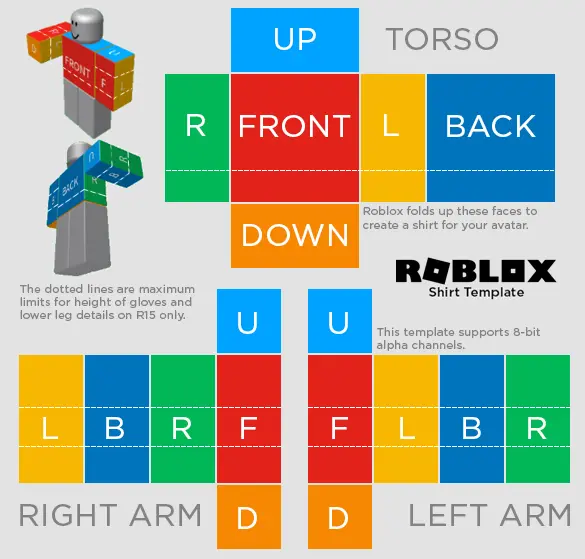
Standard Roblox Shirt Template
The official 585×559 blank Roblox shirt template with all body regions mapped — torso front, back, sides, and sleeves.
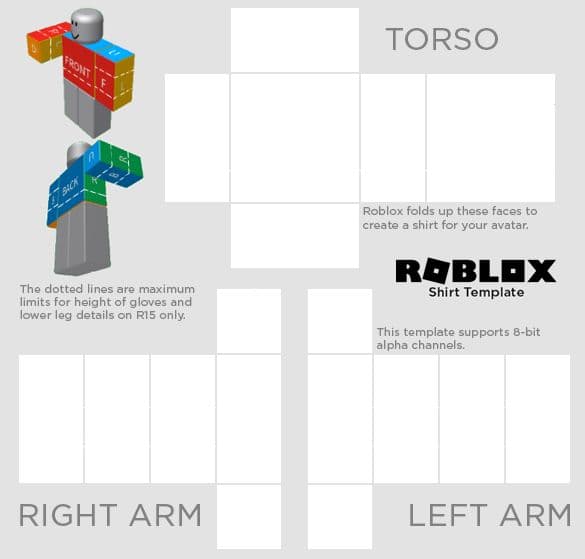
Transparent Roblox Shirt Template
Clean transparent-background shirt template — ideal as a base layer for designing Roblox shirts from scratch.
Template Layout Guide
The Roblox shirt template is divided into mapped regions corresponding to body parts. The torso front sits center-left, torso back on the right, and arm sections are narrow columns on each side.
Focus on the torso front first — it's what players see most. Ensure design elements align across section boundaries for a seamless 3D look.
Explore More Template Types
Frequently Asked Questions
Are Roblox shirt templates free to use?
Yes. Every Roblox shirt design in our gallery is completely free to download. Save the 585×559 PNG and upload it to roblox.com/create — no sign-up required to browse or download.
How do I make a custom Roblox shirt?
Two ways: browse our gallery and pick from hundreds of ready-made Roblox shirt designs, or use our AI shirt maker to generate a unique design from a text description. Both options give you a properly formatted shirt template file.
Do I need Photoshop to create Roblox shirts?
No. Our AI generates finished Roblox shirt designs from text prompts — no image editor needed. If you prefer designing from scratch, download the blank shirt template and use any editor like GIMP, Pixlr, or Canva.
What size is the Roblox shirt template?
The standard Roblox shirt template is 585×559 pixels in transparent PNG format. The image wraps around the character's torso, arms, and sleeves — covering front, back, and both sides.
Can I sell Roblox shirts made with AI?
Yes. Shirt designs created with our AI can be sold on the Roblox Marketplace. Since July 14, 2026, uploading classic clothing requires ID verification or a linked parent account and an 80 Robux upload fee. Selling it also requires 2-step verification, a Plus or Premium membership and a 10 Robux publishing advance. See our full guide to the 2026 Roblox clothing update.
How do I upload a shirt to Roblox?
Go to roblox.com/create, select Shirts under Classic Clothing, upload your 585×559 PNG file, set a name and price, then click Upload. Since July 14, 2026, uploading requires ID verification or a linked parent account and an 80 Robux fee. Selling it also requires 2-step verification, a Plus or Premium membership and a 10 Robux publishing advance.
Create Your Own Roblox Shirt Design
Describe any style you can imagine — our AI generates a custom Roblox shirt template in seconds, properly formatted and ready to upload.